ZArchiver13.2
Publisher Description
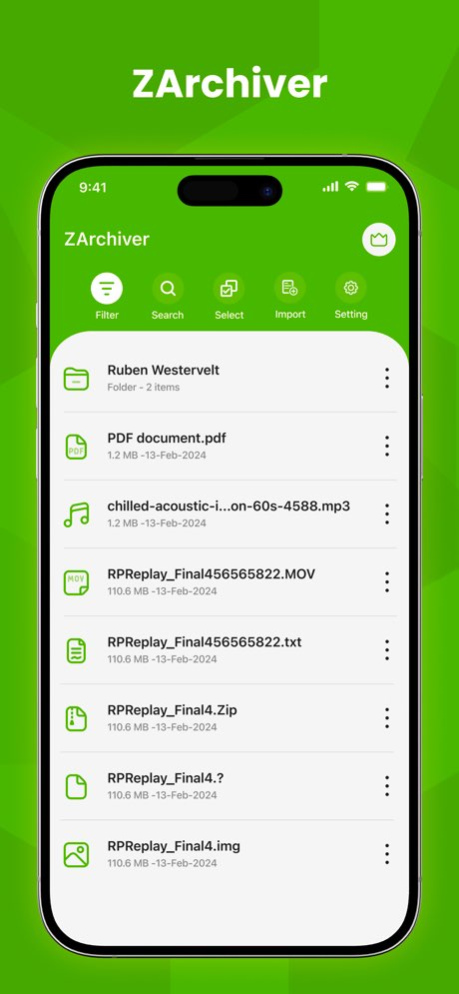


It’s a ZArchiver file compressor and also a zip file opener that works on the extraction and compressing of files like doc docx ppt pptx xls xlsx files. ZArchiver File compressor to Compress all your documents with the most useful application known as Zip unzip tool Unarchiver tool & zip file opener. You can easily reduce your files and extract all your extract files with the zip tool and also you can combine all the files and compress them easily. Zip file manager Compress all your docs, Easy zip tool Rar file reader can read your Rar files from your phone. Easy zip unzips files application will help you read zip files and convert them into unzipped files and folders. All files compressor can zip and unzip your files and Easily zip tool with the help of 7z file reader. You can compress files and make them shrink with one click. Extract all your zip files and RAR files with this ZArchiver app.
Features:
- Easy unzip zip files that you need to compress and extract for your need.
- Zip all your larger files and reduce their size.
- Compress all documents with one click and shrink their size on disk.
- Easy zip tool will help you to compressor all files from your iPhone.
- Multiple Documents can be compressed with this ZArchiver application.
- Compress your files like pdf files xls files txt files send or share with anyone.
- Folder Compressor will Compress your files and folders for sending to someone.
- All files compressor can unzip your files your compressed files with one click.
- All files zip can be converted into unzip or extracted files with the help of this Rar files Opener.
- Easily compress your files and folder like photos and videos.
- All photos and videos zipper or compressor application will help you to decrease the size of your favorite file.
- Extract your large Rar files with the help of this RAR file reader
- Easy file extractor for zip files formats
- Files Archiver will help you Unarchiver files for you so you can see what is inside that compressed file
How to use this ZArchiver application:
- First, you need an open application and is easy to use as it has a simple but rich interface
- Choose your photos and videos or any document you want to compress.
- Compress all these files with the zip tool ZArchiver application.
- Also check out the videos and photos compressor which will rapidly convert your files into supported file formats.
- Unzip all your folders or files by selecting any compressed file from the list of ziped files which are being shown by the zip file opener.
- Easily find your extracted files in separate activities.
- Zip and unzip your pictures, videos, and files including your all office work files easily and school work.
- You can make your files and folders size more shrink and reduce its size easily and share them with your friends or anyone.
SUBSCRIPTION AND TERMS:
You may purchase an auto-renewing subscription through an In-App Purchase to enjoy all App Features without Ads:
. Auto-renewable subscription
. Weekly ($2.99), 1 month ($4.99) and 1 year ($29.49) durations
. Your subscription will be charged to your iTunes account at confirmation of purchase and will automatically renew (at the duration selected) unless auto-renew is turned off at least 24 hours before the end of the current period.
. Current subscription may not be cancelled during the active subscription period; however, you can manage your subscription and/or turn off auto-renewal by visiting your iTunes Account Settings after purchase.
Read our full Terms of Service and our Privacy Policy at:
* Link to Privacy Policy: https://zipunzipextractor.blogspot.com/2022/08/privacy-policy.html
* Link to EULA: https://zipunzipextractor.blogspot.com/2022/08/end-user-license-agreement-eula-of-zip.html
* Link to Terms of use: https://zipunzipextractor.blogspot.com/2022/08/terms-condition.html
Minor bug fixes
About ZArchiver
The company that develops ZArchiver is Namrata Akabari. The latest version released by its developer is 13.2.
To install ZArchiver on your iOS device, just click the green Continue To App button above to start the installation process. The app is listed on our website since 2026-03-06 and was downloaded 6 times. We have already checked if the download link is safe, however for your own protection we recommend that you scan the downloaded app with your antivirus. Your antivirus may detect the ZArchiver as malware if the download link is broken.
How to install ZArchiver on your iOS device:
- Click on the Continue To App button on our website. This will redirect you to the App Store.
- Once the ZArchiver is shown in the iTunes listing of your iOS device, you can start its download and installation. Tap on the GET button to the right of the app to start downloading it.
- If you are not logged-in the iOS appstore app, you'll be prompted for your your Apple ID and/or password.
- After ZArchiver is downloaded, you'll see an INSTALL button to the right. Tap on it to start the actual installation of the iOS app.
- Once installation is finished you can tap on the OPEN button to start it. Its icon will also be added to your device home screen.
Program Details
System requirements
Download information
Pricing
Version History
version 13.2
posted on 2026-03-06
Minor bug fixes
version 11.0
posted on 2025-01-21
Jan 21, 2025
Version 11.0
- Bug Fixed
version 9.0
posted on 2024-08-29
Aug 29, 2024
Version 9.0
- Bug fixes
version 8.0
posted on 2024-08-01
Aug 1, 2024
Version 8.0
- Bug fixes
version 7.0
posted on 2024-07-10
Jul 10, 2024
Version 7.0
- Bug fixes
